Understanding the internal structure of meer21cm
The best way to understand the inner workings of a package is always to read the source code. However, in some cases, it is easier to start with some logging to see what part of the source code gets triggered by your calculation. This is of course also very useful for debug purposes. We provide a few examples below.
[1]:
from meer21cm import PowerSpectrum, MockSimulation
import numpy as np
import matplotlib.pyplot as plt
from meer21cm.plot import plot_map

# turn on info level logging
import logging
logging.basicConfig(level=logging.INFO)
[2]:
ps = PowerSpectrum(
    band='L',
    survey='meerklass_2021',
)
ps.get_enclosing_box()
INFO:meer21cm.dataanalysis:found meerklass_2021_L in predefined settings, using default settings and override the following parameters: nu, nu_min, nu_max, num_pix_x, num_pix_y, wproj
INFO:meer21cm.power:get_enclosing_box: setting self.box_len, self.box_origin, self.box_ndim
INFO:meer21cm.power:get_enclosing_box: setting the model self.kmode and self.mumode to correspond to the field k-modes
You can see that, setting band='L' and survey='meerklass_2021' trigger the initialisation to automatically set predefined frequency and map dimensions parameters, which determines the survey lightcone. Then, invoking get_enclosing_box triggers the calculation to find the dimensions of the rectangular box that encloses the defined survey lightcone.
Let’s see another example of invoking the model power spectrum for the first tracer (usually assumed to be HI):
[3]:
ps.auto_power_tracer_1_model;
INFO:meer21cm.cosmology:get_matter_power_spectrum_camb: setting self._matter_power_spectrum_fnc
INFO:meer21cm.power:get_model_power_noobs_i: setting self._auto_power_tracer_1_model_noobs
INFO:meer21cm.power:get_model_power_i: setting self._auto_power_tracer_1_model
INFO:meer21cm.power:multiplying _auto_power_tracer_1_model with mean_amp_1**2: 1.0**2 to get auto_power_tracer_1_model
You can see that, in order to get ps.auto_power_tracer_1_model, it internally invokes get_matter_power_spectrum_camb to calculate the linear matter power spectrum first. Then get_model_power_i is used to set ps._auto_power_tracer_1_model, which is then multiplied by ps.mean_amp_1**2 to get the ps.auto_power_tracer_1_model.
[4]:
ps.auto_power_tracer_2_model;
ps.tracer_bias_2 is None
INFO:meer21cm.power:tracer_bias_2 is None, returning None
[4]:
True
You can see that, since ps.tracer_bias_2 is None by default, invoking ps.auto_power_tracer_2_model returns None. You can set a bias and recalculate:
[5]:
ps.tracer_bias_2 = 1.5
ps.auto_power_tracer_2_model;
INFO:meer21cm.power:get_model_power_noobs_i: setting self._auto_power_tracer_2_model_noobs
INFO:meer21cm.power:get_model_power_i: setting self._auto_power_tracer_2_model
INFO:meer21cm.power:multiplying _auto_power_tracer_2_model with mean_amp_2**2: 1.0**2 to get auto_power_tracer_2_model
On the other hand, if you want to add temperature unit to the power spectra, you can do:
[6]:
ps.omega_hi = 5e-4
ps.mean_amp_1 = "average_hi_temp"
[7]:
ps.auto_power_tracer_1_model;
INFO:meer21cm.power:getting mean_amp_1 from self.average_hi_temp
INFO:meer21cm.power:multiplying _auto_power_tracer_1_model with mean_amp_1**2: 0.00010282763474838113**2 to get auto_power_tracer_1_model
You can see that the code internally invokes the calculation of the mean brightness temperature and multiplies it to the power spectrum.
Note that, in this case, since the power spectrum calculation has been invoked before and stored within the _auto_power_tracer_1_model attribute, the calculation is not repeated, as you can see from the log information.
Now let us look at a case of generating mock observation:
[8]:
mock = MockSimulation(
    survey='meerklass_2021',
    band='L',
    num_discrete_source=1000000,
    mean_amp_1='average_hi_temp',
    tracer_bias_1=1.5,
    tracer_bias_2=1.5,
    omega_hi=5e-4,
)
INFO:meer21cm.dataanalysis:found meerklass_2021_L in predefined settings, using default settings and override the following parameters: nu, nu_min, nu_max, num_pix_x, num_pix_y, wproj
[9]:
mock.data = mock.propagate_mock_field_to_data(mock.mock_tracer_field_1);
INFO:meer21cm.power:get_enclosing_box: setting self.box_len, self.box_origin, self.box_ndim
INFO:meer21cm.power:get_enclosing_box: setting the model self.kmode and self.mumode to correspond to the field k-modes
INFO:meer21cm.cosmology:get_matter_power_spectrum_camb: setting self._matter_power_spectrum_fnc
INFO:meer21cm.power:get_model_power_noobs_i: setting self._auto_power_tracer_1_model_noobs
INFO:meer21cm.mock:invoking get_mock_field_from_power assuming lognormal distribution
INFO:meer21cm.mock:get_mock_tracer_field: setting _mock_tracer_field_1
[10]:
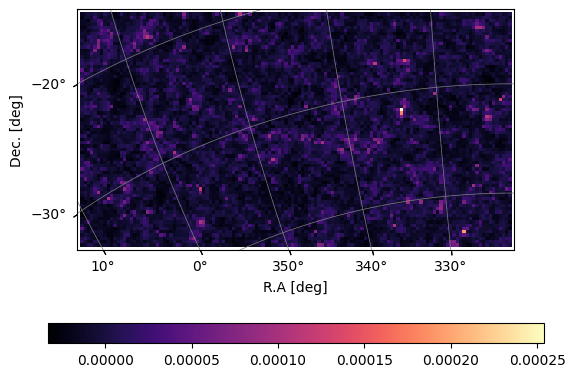
plot_map(mock.data, mock.wproj, W=mock.W_HI)
[11]:
mock.propagate_mock_tracer_to_gal_cat()
INFO:meer21cm.power:get_model_power_noobs_i: setting self._auto_power_tracer_2_model_noobs
INFO:meer21cm.mock:invoking get_mock_field_from_power assuming lognormal distribution
INFO:meer21cm.mock:get_mock_tracer_field: setting _mock_tracer_field_2
INFO:meer21cm.mock:get_mock_tracer_position_in_box: setting _mock_tracer_position_in_box
INFO:meer21cm.mock:invoking get_mock_tracer_position_in_radecz with flat_sky=False: setting _mock_tracer_position_in_radecz
INFO:meer21cm.mock:propagate_mock_tracer_to_gal_cat: setting ra_gal, dec_gal, z_gal with trim=True
You can see that, by generating the discrete mock tracers and propagate them into souce catalogues, first the input power spectrum _auto_power_tracer_2_model_noobs is calculated. The mock tracer field is then generated and stored in _mock_tracer_field_2, which is then used to generate _mock_tracer_position_in_box. The source positions in the rectangular box are then used to generate their positions in (RA,Dec,z) and stored in _mock_tracer_position_in_radecz. Finally, they are
passed to the ra_gal, dec_gal and z_gal, after trimming out sources outside the survey lightcone.
If you want more detailed logging information, you can turn up the level of logging output to DEBUG by logging.basicConfig(level=logging.DEBUG). Note that however the output will be excessive.